Screenshots show the simulator. Pocket layouts follow the site’s recorded references; unverified layouts disable packing. Weight rules use a dated data snapshot and do not certify the behavior of every current game build.
1. Check pocket shape, not only free cells
Each backpack pocket has its own grid. An item must fit entirely inside one pocket; a two-cell item cannot bridge two separated one-cell gaps. Changing backpacks may leave items unpacked. They are still listed and still count toward cost until you move or remove them.
In the simulator, tapping an item normally removes it. To rearrange safely, turn on Arrange items, select an item, use Rotate if necessary and tap an empty cell. Auto arrange tries to pack the retained items; check Unpacked equipment afterwards.
2. Read sling capacity separately
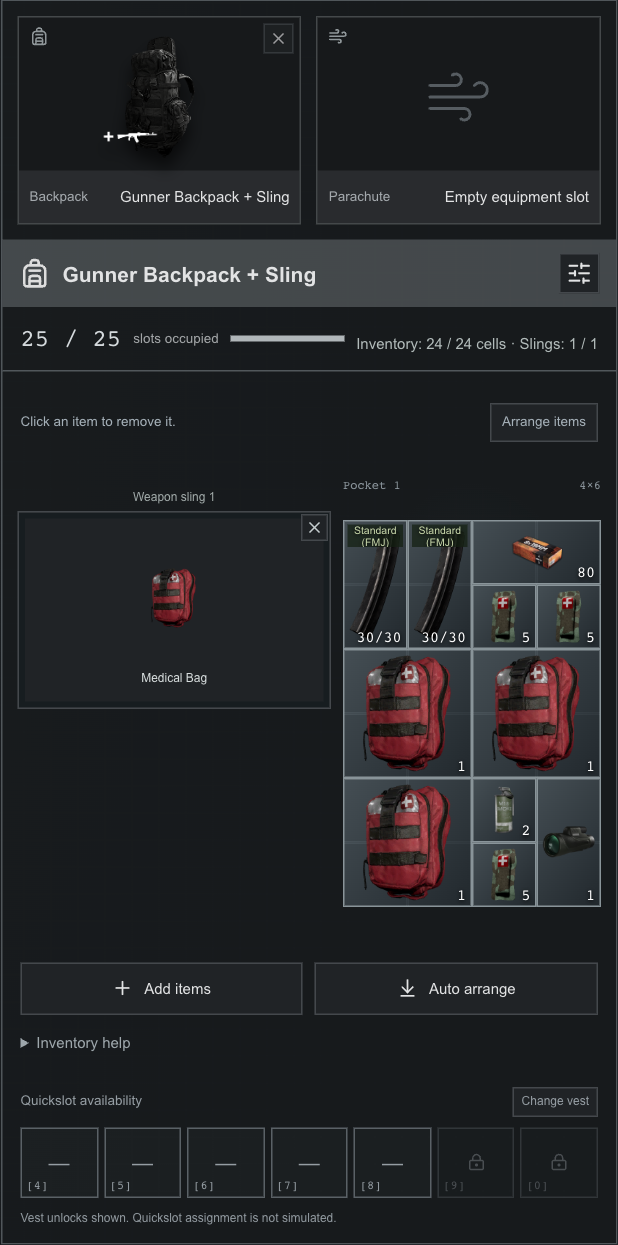
Backpacks with slings show narrow equipment slots beside the cargo grid. Those slots do not become extra cargo cells. The capacity display breaks the total into inventory cells and occupied sling slots.
For a recorded 24-cell backpack with two slings, the total can be 26 slots: 24 inventory cells plus two slings. That does not mean a 26-cell rectangle. A partly empty sling also cannot absorb an item that does not fit the normal pocket. This is a capacity example, not a recommendation that every role can buy that backpack.
3. A tactical vest does not enlarge the backpack
The simulator displays vest quickslot availability separately. Selecting a different vest changes those shown quickslots, not the backpack’s cargo grid. Quickslot assignment itself is not simulated.
Plan the supplies you need before buying extra storage. For the same mission, compare a ready spare magazine, additional loose rounds and specialist supplies; inspect both the occupied cells and the resulting weight rather than filling every empty space by default.
4. Open weight details before trusting the total
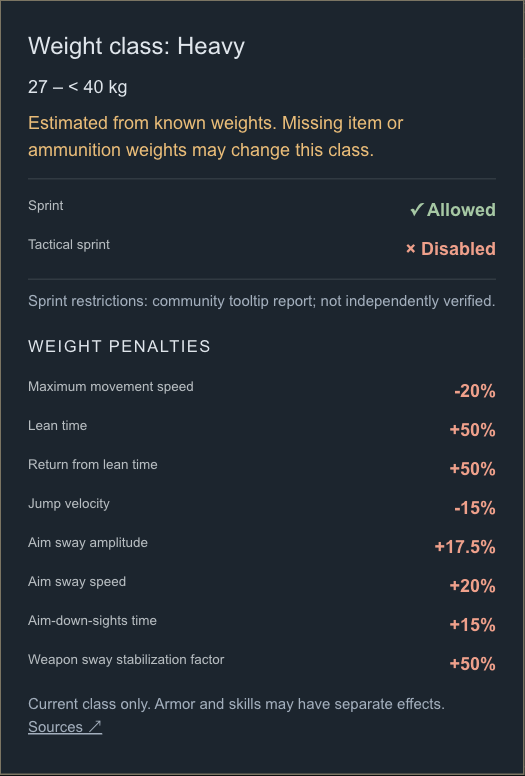
Tap the Equipment weight card to open the modeled weight class and penalties. Tap again to close it. The tooltip shows modifiers for the current class; it is not a list of every possible armor or skill effect.
A number followed by “+ ?” is a known subtotal with missing weights. Adding ammunition with an unknown weight may leave that subtotal unchanged; it does not make the ammunition weightless. If the actual total crosses a class boundary, the shown class may be wrong.
Sprint restrictions are separately labeled as a community tooltip report. They are not independently verified by the stored modifier table. Confirm mobility in the current client before treating a loadout as a guaranteed movement breakpoint.
Common questions
Why will an item not fit when the counter shows free space?
Its footprint may not fit the available shape or pocket. Try arranging or rotating it; cells in different pockets cannot be joined.
Did changing backpacks delete my supplies?
The simulator retains supplies that no longer fit under Unpacked equipment. Repack them or explicitly remove them.
Can a vest replace a larger backpack?
Not in this simulator. Vest quickslots and backpack cargo space are modeled separately.
Sources & scope
Steps are checked against the current tools on this site. External references provide game context; missing fields and version limits remain visible in the tools and source notes.